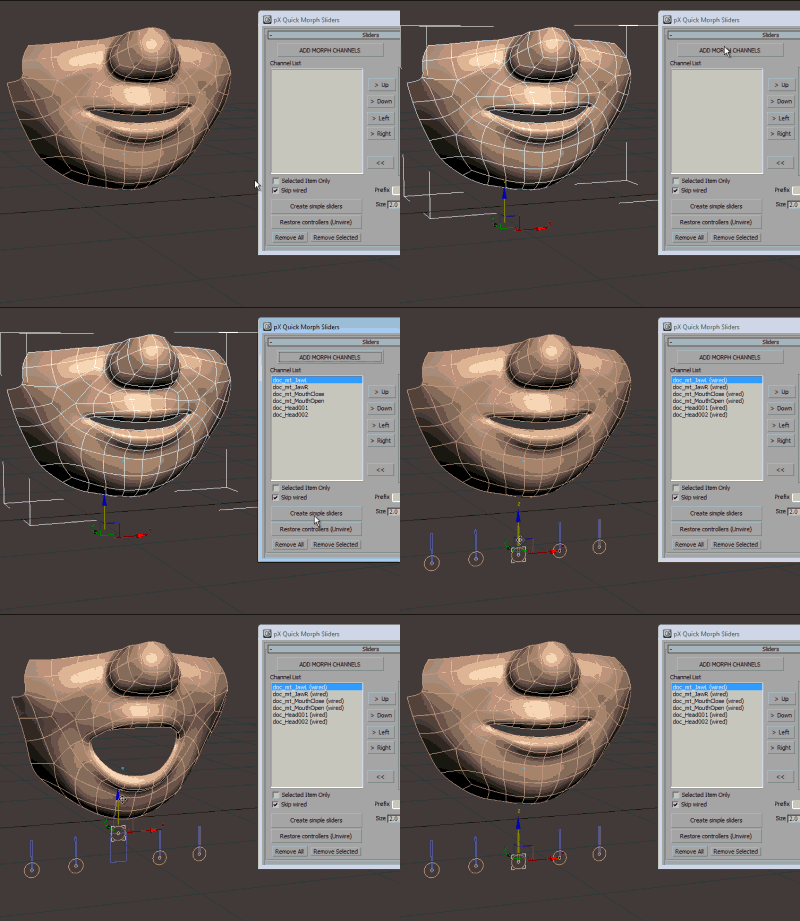
pX Quick Morph Sliders is a great time saver MacroScript for automated creation of slider controls using shapes. It only takes a few clicks and you'll have controls wired to morph channels.
Features: - Mixing up to 4 channels. - Restoring controls. - Creating multiple or selected. - Name prefix and shape colors. - Visual feedback!
Right-Click>Save as to download or
see on Github here.
Quick Start
- Install
pxQMorphSliders.ms on your 3Ds Max. - Customize your menus: Category: '
pX Tools', item: '
MorphSliders'. - Open
Quick Morph Sliders floater. - Select an object with the Morpher modifier applied. - Click:
ADD MORPH CHANNELS to feed the list. - Click:
Create simple sliders. - Done! :D All of your morpher channels now have simple shape controls wired to them.
Note: The scene in the video is included with the script download. It is a cartoon-style mouth with 6 morph targets!
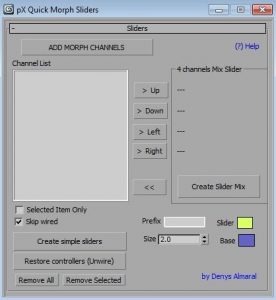
User Interface reference:Add morph channels: Click this button to get all morph channels from the selected objects.
Channel List: Morph channel names list.
Selected Item Only: Create simple sliders from the selected items on the list.
Skip wired: Skip morph channels if already connected by wire parameters.
Create simple sliders: Create simple slider shapes ready for animation.
Restore controllers (unwire): Disconnects wire parameters and restores Beizer Float controllers.
Remove All, Remove Selected: Remove morph channels from the list.
4 Channels: Mix Slider, Up, Down, Left, Right: Assigns morph channels to any of the four directions a mixer slider can move.
Create Slider Mix: Creates a slider mixing up to 4 channels.
Prefix: Add a prefix to every shape object created by this tool.
Size, Slider color, Base color: Customize appearance. Please leave a comment to let me know if this script was useful to you. Share your Max version and tell me if it has any problems, crashes, or bugs! Enjoy!